Be yourself; Everyone else is already taken.
— Oscar Wilde.
This is the first post on my new blog. I’m just getting this new blog going, so stay tuned for more. Subscribe below to get notified when I post new updates.
Be yourself; Everyone else is already taken.
— Oscar Wilde.
This is the first post on my new blog. I’m just getting this new blog going, so stay tuned for more. Subscribe below to get notified when I post new updates.
Pada kesempatan kali ini saya akan membuat tutorial membahas cms wordpress di debian 8.
Oke langsung saja, bahan-bahan yang dibutuhkanin yaitu:
1. WinSCP
2. unduh WordPress
* Sebelum kamu dapat mengakses cms wordpress, Dns Server kamu sudah di atur .
* Setelah itu lanjutkan instal apache2 dan php5

* Kemudian ketik Y untuk melanjutkan proses penginstallan
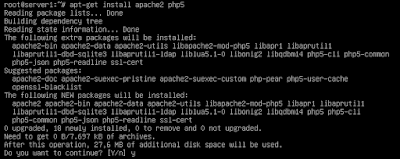
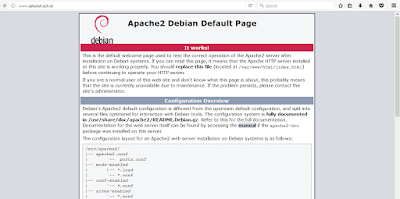
* Setelah itu restart apache2

* Lalu cobak di browser web
* Langkah selanjutnya Instal phpmyadmin mysql-server dan ssh

* Kemudian ketik Y untuk melanjutkan proses instalasi
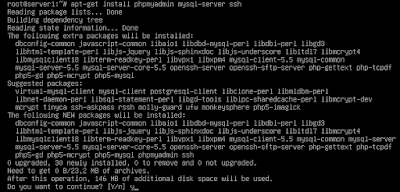
* Menggunakan kata sandi untuk akun mysql
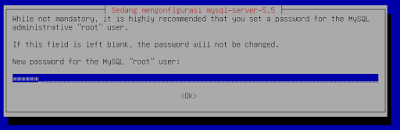
* Memasukkan lagi kata sandi
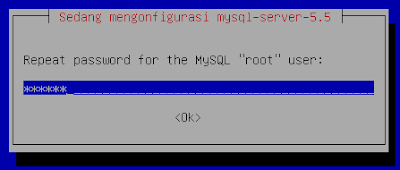
* Kemudian Pilih apache dengan mengeklik spasi
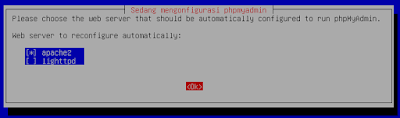
* Setelah itu pilih YA
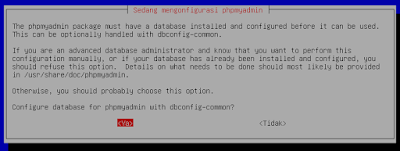
* Memindahkan basis data kata sandi
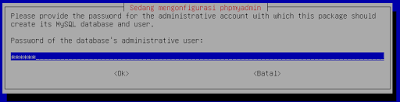
* Simpan lagi kata sandi akun mysql
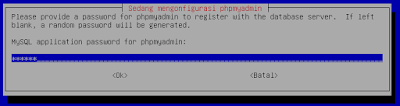
* Kemudian masukan kata sandi konfirmasi
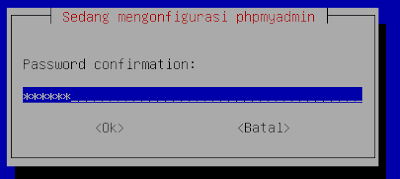
* Setelah selesai, masuk ke ssh

* Kemudian untuk melihat isi dari ssh ketik LS yang lalu masuk

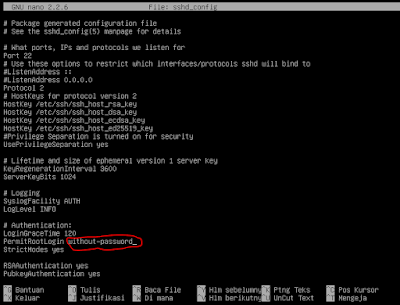
* Kemudian edit sshd_config
* hapus yang ada lingkaran merah
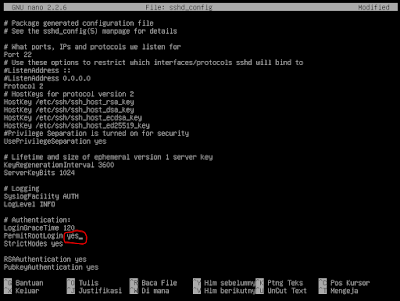
* Kemudian ubah menjadi “yes” tidak pake tanda petik, setelah itu simpan dengan ctrl + y, x enter
* Kemudian restart sshnya

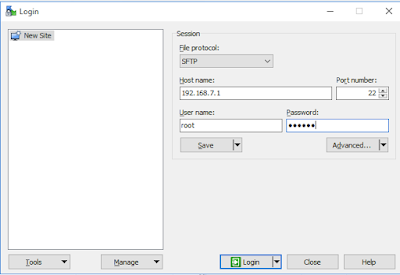
* Kemudian buka wincsp, hostname masukan ip atau nama doimain kemudian username input root dan input password root-nya
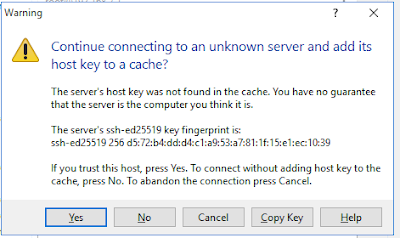
* klik yes untuk melanjutkan
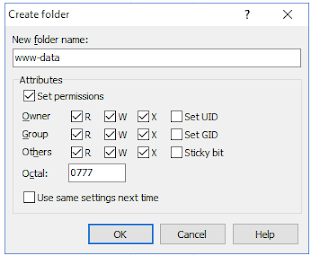
* Kemudian buat direktori di dalam / var / www /
* direktori bernama www-data, atur hak akses seperti gambar di bawah, setelah itu klik ok
* Kemudian unggah file wordpress ke direktori www-data yang ada di / var / www / www-data, setelah itu klik ok
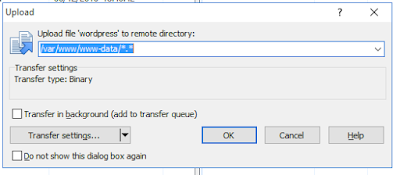
* Tunggu proses unggah selesai
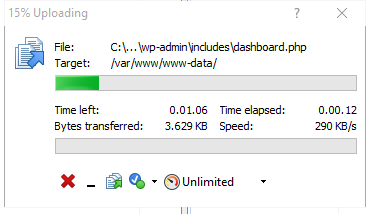

Setelah selesai mengunggah, buka direktori wordpress yang ada di / var / www / www-data / wordpress lalu masuk

* Kemudian ketik ls untuk melihat isi direktori wordpress

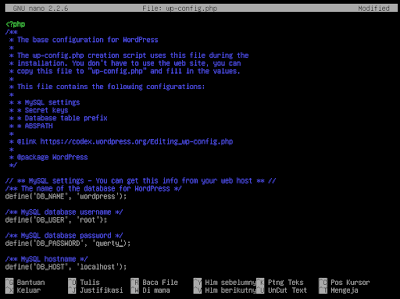
* Kemudian salin file wp-config-sample.php menjadi wp-config.php

* Kemudian edit wp-config.php, seperti gambar di bawah, lalu simpan dengan ctrl + x, y lalu masukkan
* Kemudian masuk ke apache2

* Ketik ls untuk melihat isi dari apache2

* Kemudian edit file apache.conf
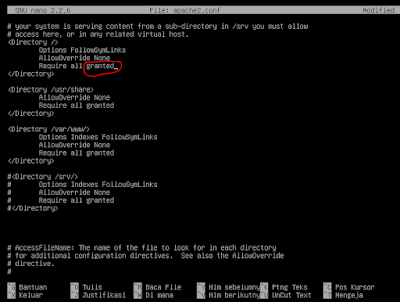
* Hapus yang di lingkari garis merah
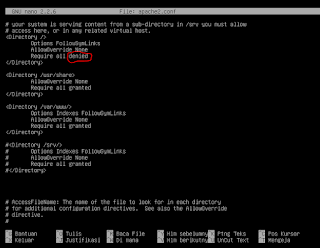
* Ubah menjadi diberikan lalu simpan dengan ctrl + x, y lalu masuk
* Kemudian Masuk ke situs-tersedia

* Setelah Masuk situs-tersedia ketik ls untuk melihat isinya

* Kemudian salin 000-default.conf menjadi wordpress.conf

* Setelah selesai mengcopy file edit wordpress.conf
* edit seperti gambar dibawah
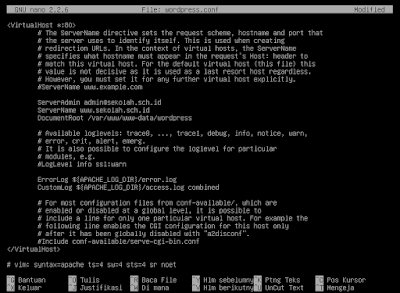
* Setelah selesai, nonaktifkan 000-default.conf

Assalamualaikum
Izinkan saya untuk memperkenalkan diri, nama saya Muhammad Bayu Firdaus, kalian bisa memanggilku bayu. Saya berasal dari Salatiga,Dan saya lahir 7 Desember 2002 di Semarang.saya mempunyai hobi futsal,Saya tinggal bersama orang tua saya. Saya mempunyai satu saudara perempuan. Dan saya adalah anak terakhir.Oke, saya rasa itu saja tentang diri saya. Terima kasih banyak atas perhatiannya Wassalamualaikum.
This is an example post, originally published as part of Blogging University. Enroll in one of our ten programs, and start your blog right.
You’re going to publish a post today. Don’t worry about how your blog looks. Don’t worry if you haven’t given it a name yet, or you’re feeling overwhelmed. Just click the “New Post” button, and tell us why you’re here.
Why do this?
The post can be short or long, a personal intro to your life or a bloggy mission statement, a manifesto for the future or a simple outline of your the types of things you hope to publish.
To help you get started, here are a few questions:
You’re not locked into any of this; one of the wonderful things about blogs is how they constantly evolve as we learn, grow, and interact with one another — but it’s good to know where and why you started, and articulating your goals may just give you a few other post ideas.
Can’t think how to get started? Just write the first thing that pops into your head. Anne Lamott, author of a book on writing we love, says that you need to give yourself permission to write a “crappy first draft”. Anne makes a great point — just start writing, and worry about editing it later.
When you’re ready to publish, give your post three to five tags that describe your blog’s focus — writing, photography, fiction, parenting, food, cars, movies, sports, whatever. These tags will help others who care about your topics find you in the Reader. Make sure one of the tags is “zerotohero,” so other new bloggers can find you, too.

 Bayu
Bayu